Cookie settings

Necessary, always on: they keep the site working and remember your cookie choice.

Skip to content
Skip to content

Security architecture. Evidence status.

Check what IRIS reads, keeps and sends before you approve it.

Each security claim in the table and cards carries an evidence status: tested, documented or not yet. The table lists what leaves your network.

Architecture

Six components in your environment

Applies to IRIS v1, the release customers receive; checked November 7, 2026. When you host IRIS, these six components run inside your environment.

Sources you connect

Databases and data warehouses
Cloud storage
Microsoft 365
Google Workspace
Selected SaaS and code platforms
Read-only access

Your environment: your cloud account or data center

Web appThe screens your team uses
APIHandles requests from the web app
Scan workerConnects to sources and runs scans
IRIS databaseFindings, coverage records and evidence
CacheTemporary data for running jobs
Audit trailActivity recorded by IRIS
  • Read-only access
  • Stored samples masked by default
  • Every scan dated

Outbound connections

License serviceAt activation, and when an admin validates
Cloud and SaaS sources you scanOnly during scans of those sources
Time sourceKeeps the host clock in sync; can be your own
Sources you connect: databases and data warehouses, cloud storage, Microsoft 365, Google Workspace, and selected SaaS and code platforms. IRIS reads them through the accounts you create, from your environment, your cloud account or data center, where the web app, API, scan worker, IRIS database, cache and audit trail run. Outbound, IRIS connects to the license service at activation and when an admin validates, and to the cloud and SaaS sources you choose to scan, during those scans. The host keeps its clock in sync with a time source, which can be your own. The exact hosts are in our security pack, sent on request.
Read-only access rests on the accounts you create. Stored samples are masked by default for personal-data columns; an administrator can switch storage off.
Data handling

What crosses your network edge in one scan

Example: IRIS on EC2, scanning Amazon RDS for PostgreSQL in the same VPC and a Microsoft 365 tenant. Tested means seen in our November 2, 2026 packet capture.

What crosses your network edge in one scan
ConnectionWhenWhat it carriesLeaves your network?Evidence
PostgreSQL database (same VPC)During its scanRead queries for the catalog and a sample of each table out; table metadata and sampled values back to IRISNo: it stays in your VPCDocumented
Microsoft 365 tenantDuring its scanRead requests to your own tenant, under tenant-wide read permissions; file content back to IRISYes, to Microsoft’s servicesDocumented; no Microsoft 365 scan in our capture
License serviceAt activation, and when an admin validatesThe license key and install details such as the host name; no findings or source dataYes, to Sylox’s license service, which runs in IndiaTested: destination seen in our capture. Payload documented
AWS Systems Manager, if you use itWhile its agent runs on the hostHost status and the sessions your team startsYes, to AWS, unless you use VPC endpointsDocumented
Time sourceWhen the host syncs its clockTime requests onlyNot with Amazon Time Sync; yes with a public time serverTested: lookups seen in our capture
Emailed reports, if you turn them onWhen a report is scheduledReport PDFs, through your email relayYes, through your relayDocumented
Findings and stored samplesNot sent otherwiseKept in the IRIS database you host, for your team’s review and evidenceNoDocumented; logs and temporary files aren’t covered here

Check the table in your own flow logs

Sylox wrote this CloudWatch Logs Insights query from the AWS documentation and hasn’t yet tested it in our lab; its output lists public destinations to reconcile with the table. On other clouds or on-premises, capture the host’s traffic during a test scan instead.

TextFrom Amazon Web Services documentation, page updated November 7, 2026; not yet tested by Sylox.
# Before you start: VPC Flow Logs on for the IRIS host’s network interface, in the default
# format, sent to a Standard-class CloudWatch Logs group.
# Least privilege: logs:StartQuery on that log group only, plus logs:GetQueryResults,
# logs:StopQuery and logs:DescribeLogGroups, which AWS doesn’t scope to one group. If the group
# masks IP addresses, results can be masked or incomplete: read them from a group that doesn’t mask.
# Time range: the test scan plus 10 minutes either side; run it 10 minutes after the scan ends.
# Replace 10.0.1.25 with the host’s private IPv4 address.
fields dstAddr, dstPort, protocol, action, bytes
| filter srcAddr = "10.0.1.25" and isPublicIP(dstAddr)
| stats count(*) as flows, sum(bytes) as totalBytes by dstAddr, dstPort, protocol, action
| sort totalBytes desc
# Expect Microsoft 365 addresses on port 443 (protocol 6) during that scan, AWS Systems
# Manager addresses on 443 if you manage the host with it, a public time server on 123
# (protocol 17), and the license service only if an admin activated or validated. Match
# Microsoft addresses against Microsoft’s published Microsoft 365 IP address ranges.
# Not shown: Amazon DNS and Amazon Time Sync traffic, IPv6, and anything sent through a
# proxy or VPC endpoint, so read the proxy log instead. REJECT means a security group or
# network ACL refused the packet, or it arrived after the connection closed.
# Then check the same window for gaps in the log itself:
#   filter logStatus = "SKIPDATA" | stats count(*) by interfaceId, bin(1m)
Capabilities

Each security claim and its evidence status

Tested: we ran it and kept the result. Documented: read in IRIS v1; we haven’t tested it independently. Not yet: no test or attestation exists.

Reads with accounts you create

IRIS reads your sources through accounts you create, and each account’s grants set what it can reach. How IRIS limits itself to read access varies by source type.

Evidence status

Documented. Some credentials, such as an Azure storage key, can also write, so the limit rests on your setup there. The pack lists each source type.

Encrypted source credentials

Source credentials are encrypted at rest inside your deployment.

Evidence status

Documented. Where the key is kept, who can read it and how it rotates are in the security pack.

Sign-in and roles

Users sign in through OIDC single sign-on, so MFA follows your identity provider’s policy, or with passwords IRIS stores hashed. SCIM provisions accounts into predefined roles.

Evidence status

Documented. OIDC and SCIM are in editions that include them. SAML isn’t supported today.

TLS in transit

Browsers reach IRIS through its bundled HTTPS edge over TLS 1.2 or later. Whether a source connection requires TLS and checks the certificate varies by source type.

Evidence status

Documented. The pack lists the default for each source type.

Platform audit trail

IRIS records activity in the platform, such as a new source being added, in its own audit trail inside your deployment.

Evidence status

Documented. An administrator sets how long it is kept. We make no claim that the trail resists alteration.

Sampled reads and stored samples

IRIS reads a sample of each table, and small tables in full. Stored samples are masked by default for personal-data columns; an administrator can mask every sample or switch storage off.

Evidence status

Documented. This page doesn’t yet cover logs, caches or temporary files during a scan; ask in your questionnaire.

Capabilities vary by edition.

How it works

How data moves during a scan

Scans run on demand or on a schedule, and every run carries its date. A first assessment and a re-scan follow the same five steps.

  1. Connect and test

    Each source connection is tested first and shows as connected, partial or failed.

  2. Read the catalog

    Schemas, tables, columns and file listings, read with the account you created.

  3. Classify locally

    IRIS classifies the values it samples inside your deployment, with pattern rules, checksums and name recognition.

  4. Keep the findings

    Findings and coverage records go to the IRIS database. Stored samples are masked by default for personal-data columns.

  5. Review and export

    Your reviewers approve, reclassify or decline each finding, then export the evidence register.

In the product

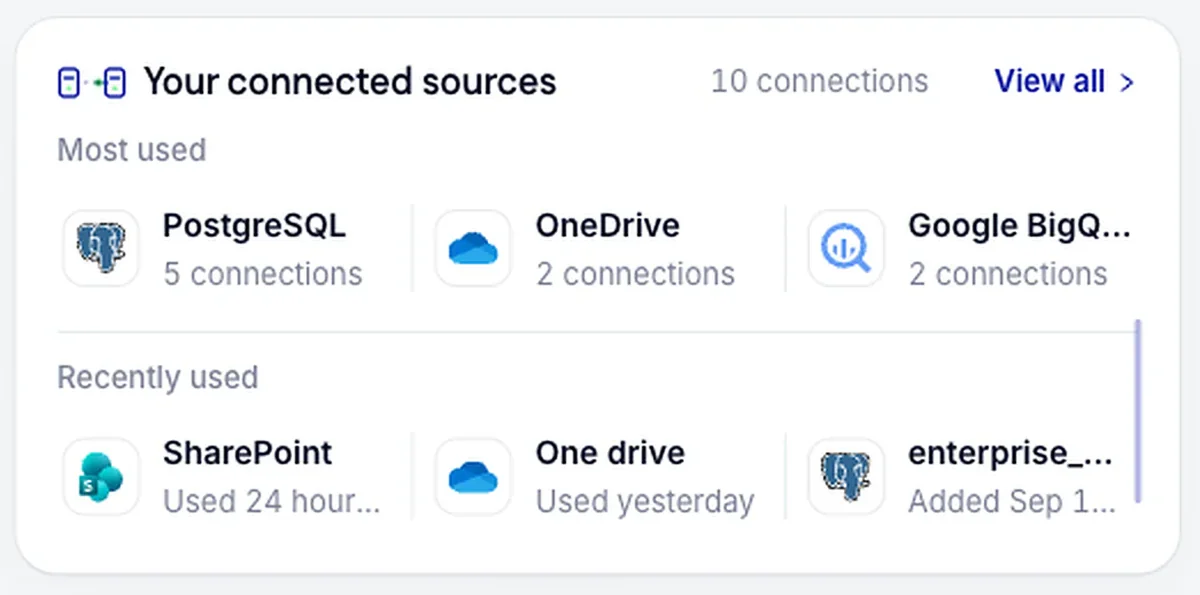
Reconcile the connections IRIS holds

Each connection with its count and when it was last used, to compare with the sources you approved.

Connect and inventory

Each connection tested before use

Connected sources sit in one place, grouped by type. Check which sources IRIS holds credentials for, and when each was last used, against the scope you approved.

Explore integrations
IRIS connected sources panel listing PostgreSQL, OneDrive, Google BigQuery and SharePoint connections with their connection counts and last use
Every connected source listed with its connection count and when it was last used.
Questions

What a vendor review asks next

How long are findings kept?

Until you delete them, in a database you run and back up. An administrator sets how long the audit trail is kept.

Evidence status

Documented. Deleted findings stay in backups until those expire; the deployment page gives the backup schedule.

Can we export the audit trail?

Yes, in editions that include data export. Administrators export it for your auditor or log store.

Evidence status

Documented. We haven’t tested the export against an auditor’s evidence requirements.

Can Sylox support reach our install?

Only through access your team grants. IRIS keeps no standing connection to Sylox, so any support session starts on your side.

Evidence status

Documented for the connection. Not yet: a written support-access procedure covering approval, logging and revocation.

What is not tested or attested yet?

Sylox holds no security certification or attestation report. The query above is untested in our lab, and our packet capture had no Microsoft 365 scan.

Evidence status

Not yet. The trust page dates each item.

Overview

What the security pack adds

The security pack holds what a firewall team and an auditor need beyond this page. It lists each outbound host with its port and purpose, including install-time connections, and gives the grants and read-only setup for each source type. It also covers how source credentials are encrypted and where the key is kept; ask for it through the contact page.

Sylox holds no security certification or attestation report yet, and the trust page keeps the current status. Sylox operates from India and the United States, and the license service runs in India. We answer your security questionnaire during scoping, so send it with your request for the pack.

Next, check the install: the deployment page lists the host, the account for each source and the activation step.

FAQ

Questions from security reviews

Protect your brand. Start with your data.

Bring your security questionnaire, and ask for the security pack with the host list and the grants per source.