Cookie settings

Necessary, always on: they keep the site working and remember your cookie choice.

Skip to content
Skip to content

Sensitive data discovery. Data classification.

Find and classify sensitive data, and see what the scan couldn’t read.

The eight findings below come from one scan. Each names its source and location; a rejected candidate and two unread items are listed with the reason.

Eight findings from one scan, annotated

One scan of a seven-source estate: six databases and an HR document library. IRIS reads a sample of each table, and small tables in full, plus the files in scope; the last three rows show a rejection and two unread items.

Records
SourceLocationDetected typeWhySensitivityDecision
CRM databasecrm.person.emailEmail addressValues match the email address patternConfidentialApproved by the reviewer
Core banking databasecbs.customer_master.panPAN (India)Values have the PAN structure, including a valid holder-type letterRestrictedApproved by the reviewer
HR databasehr.employee.ssnUS Social Security numberNine digits in the SSN formatRestrictedApproved by the reviewer
Cards databasecards.card_customer.holder_namePerson nameLocal name recognition on the sampled valuesConfidentialPending review
HR document libraryOnboarding/scan_0412.pdfPassport numberText recognition read the scanned page, and the value has the passport number formatRestrictedPending review
Orders databaseshop.orders.order_numberCard number (candidate)Values that pass the Luhn check, which random digits do about one time in ten, so a reviewer checked themLowRejected by the reviewer as order numbers
HR document libraryPayroll/salaries_2026.xlsxNot classifiedThe file is password-protected, so IRIS couldn’t read itUnknownNot read: listed with the reason
Loans archive databaseWhole sourceNot classifiedThe connection failed, so no table was readUnknownFailed: recorded as a gap in the scan
Capabilities

What the scan above shows IRIS doing

Dipal Panchal on skipping classification: “I will blindly give access to the entire finance database.”

Databases and files

Lists schemas, tables, views and columns in connected databases, and files in connected storage, through the account you create, read-only where the source allows it.

In the scan above

Rows 1 to 6 each name a database column or a file path.

Checks you can verify

Classifies values with pattern rules, checksums such as Luhn for payment cards and Verhoeff for Aadhaar, and local name recognition.

In the scan above

Rows 2 and 3 match a structure; row 4 uses name recognition; row 6 passed Luhn by chance.

A review queue

Puts each finding in a review queue with a masked sample to check. The reviewer approves, reclassifies or declines it, and a decline needs a reason.

In the scan above

Rows 1 to 3 approved, rows 4 and 5 pending, row 6 declined with its reason.

Scanned documents and images

Reads the text in scanned PDFs and images with text recognition, in English and Hindi, then classifies it like any other file. Results depend on scan quality.

In the scan above

Row 5 is a scanned passport page.

Gaps on the record

Records each table and file it couldn’t read, with the reason. An unread file shows as unknown, and isn’t counted as clean.

In the scan above

Rows 7 and 8: a password-protected file and a failed connection.

Your own patterns

Adds custom patterns for identifiers specific to your organization, and can describe findings in your own sensitivity levels.

In the scan above

Not shown; you add patterns in the product.

Capabilities vary by edition.

How it works

From scope to export in four steps

  1. Scope

    Pick the sources and data types for this scan; anything left out goes on the record as a gap.

  2. Connect

    Give IRIS an account for each source that can only read, where the source allows it.

  3. Scan and classify

    IRIS reads a sample of each table, and small tables in full, plus the files in scope.

  4. Review and export

    Your reviewers decide each finding, then export it. Scans are point-in-time: schedule them, or run one on demand.

In the product

Screens behind the scan

Discovery

Trace each finding back to its source

Findings are listed by database, schema, table and column, or by file. A reviewer or an auditor can go from any row to the place it came from.

  • What IRIS couldn’t read is listed, with the reason
  • The record shows what was scanned, what failed and what was excluded
Explore integrations
IRIS results table listing classified columns with their database, schema and table
Each finding names the exact source, schema and table it came from.
Classification

Identifiers matched by pattern and checksum

The pattern library holds the built-in data types, grouped by category. Nine identifier types carry a checksum, such as payment cards, IBAN and Aadhaar, and IRIS validates it before it reports the type.

  • US, global and Indian identifiers, such as IBAN, NPI and PAN (India)
  • Custom patterns for identifiers specific to your organization
Explore data discovery
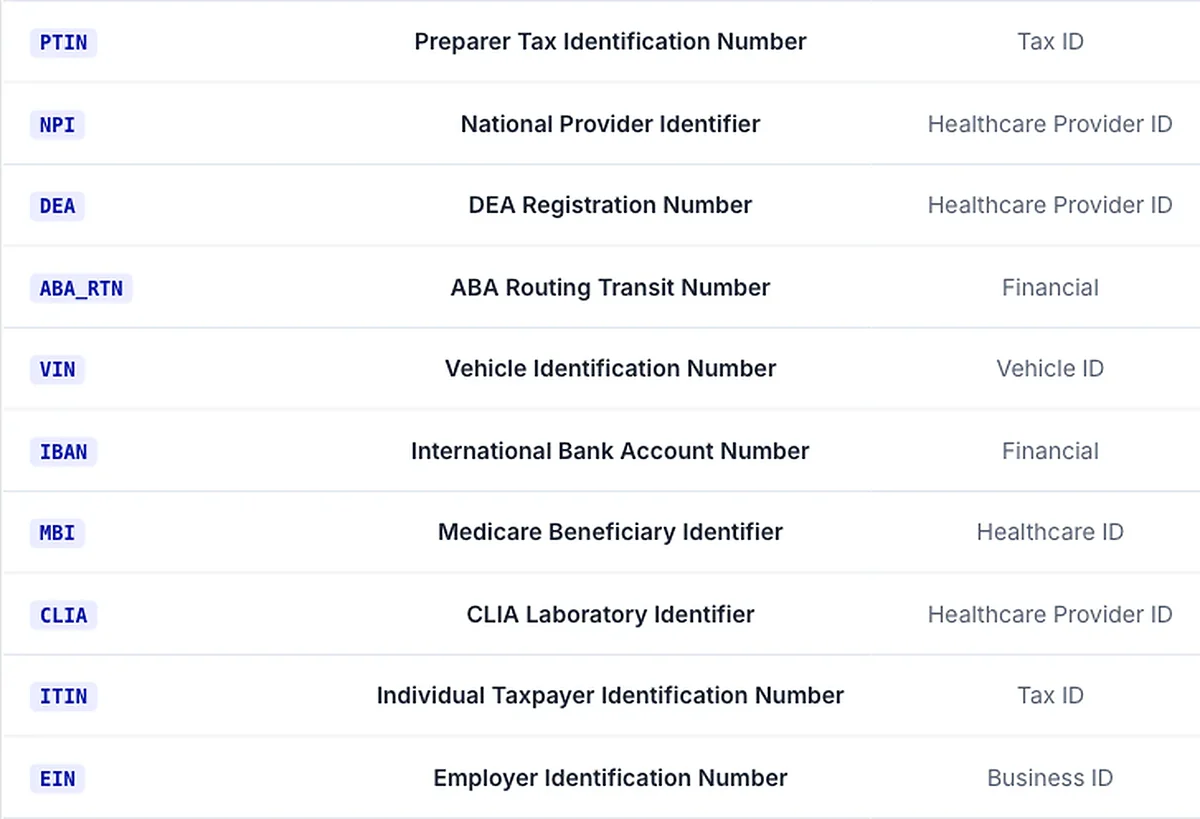
Part of the IRIS pattern library listing identifiers such as PTIN, NPI, VIN, IBAN, ITIN and EIN with their category
The pattern library covers US and international identifiers such as IBAN, EIN, NPI and VIN.
Capabilities

Counts behind the scan, with their conditions

Last checked November 8, 2026, for IRIS v1. Coverage differs by source, so we confirm what IRIS can read in yours before the first scan.

  • 103

    built-in data types

    For Indian, US and global formats; found by value or by name

  • 9

    identifier types validated by checksum

    Cards (Luhn), IBAN, NPI, Aadhaar (Verhoeff); ask for the other five

  • 12

    database and warehouse engines

    Including PostgreSQL, SQL Server, Oracle, MySQL and SAP HANA

  • 15 min*

    to scan a structured source

  • *About 100 tables, reading a sample of each table. Time depends on the number of tables and columns, not table size.

Questions

Questions the findings can answer

Where is it in the sources we connected?

Findings by source and location, built from the connected systems themselves, with each one’s review status.

Which personal data did IRIS match?

Each finding names the system it sits in and the data type it matched, in your own sensitivity levels if you set them. It covers connected sources only.

Which systems did you check?

Each finding links to the scan that found it, and a re-scan adds a new dated result beside the earlier one. Unread sources and files are listed as gaps.

Overview

What discovery doesn’t cover

IRIS classifies the sources you connect. A system nobody connects stays outside the findings, so keep your list of unconnected systems beside the coverage record.

Each scan is a reading on its date, and IRIS doesn’t trace how data moved between systems. Your team fixes what a finding shows in the source system, and a re-scan records the new condition. An audit period needs repeated scans, and your auditor decides what the findings prove.

To follow one finding from the connected source to the evidence register, read the how-it-works page.

FAQ

Limits of discovery, answered

Protect your brand. Start with your data.

Pick the database your auditor always asks about. We’ll show you what IRIS finds there, and what it couldn’t read.