Protection status by column
Checks sampled values in each sensitive column, once the check is activated on your install, and records them as encrypted, masked, hashed or plain.
Protection checks. Encryption checks. Masking checks.
IRIS checks sampled values in each sensitive column and records whether they’re encrypted, masked, hashed or in plain form, so you know which gaps to close.
Values as they sit in the source, with the state IRIS detects for each. Row six is the limit: a token shaped like a card number reads as plain.
| Value | Detected type | Label | Reason | Kept or rejected |
|---|---|---|---|---|
| 4111 1111 1111 1111 | Card number | Detected: plain | Readable digits that pass the Luhn check | Kept: fix needed |
| **** **** **** 1111 | Card number | Detected: masked | Mask characters detected in all but the last four digits | Kept: form confirmed; strength is yours to judge |
| j•••••••••@example.com | Email address | Detected: masked | Mask characters detected in the part before the @ | Kept: form confirmed; strength is yours to judge |
| GB82WEST12345698765432 | IBAN | Detected: plain | A readable account number that passes the mod-97 check (a published example IBAN) | Kept: fix needed |
| 5e884898da28047151d0e56f8dc6292773603d0d6aabbdd6… | Password | Detected: hashed | IRIS detects a 64-character hex value, the form of a SHA-256 digest; NIST SP 800-63B-4 requires salted hashing | Kept: the reviewer checks how the password is hashed |
| 5555 5555 5555 4444 | Card number | Detected: plain | Digits shaped like a card number that pass the Luhn check; IRIS can’t tell a format-preserving token from a real number | Kept as plain: the reviewer notes the token in the review reason |
| AQICAHhr4X…7Lw== | Government ID (column named nino) | Detected: encrypted | A recognized encrypted-value format detected, with no readable number | Kept: form confirmed; strength is yours to judge |
| 2222 2222 2222 | Aadhaar number (candidate) | None | A repeated-digit placeholder that also fails the Verhoeff check (not issued) | Rejected: not an Aadhaar number |
Dipal Panchal’s first priority: restricted data that is not encrypted and has no access policy, “the biggest risk you have to solve right now.”
Checks sampled values in each sensitive column, once the check is activated on your install, and records them as encrypted, masked, hashed or plain.
Checks the encryption-at-rest setting of the database itself on 9 database engines, beside the state IRIS detects in the sampled values.
Combines each column’s protection status with its sensitivity and who can reach it into a risk score, so your team sees which gaps to close first.
Records the new state with its date when your team re-scans after a change in the source, beside the state the first scan found.
Capabilities vary by edition.
Checked on November 8, 2026 against IRIS v1.
IRIS finds and classifies sensitive data in the sources you connect.
IRIS checks the form of sampled values in each sensitive column: encrypted, masked, hashed or plain.
Protection status, data sensitivity and access feed the risk score.
Your team fixes the gap in the source system, with its own tools.
A re-scan records the new state, dated like the first scan.
Each classified column shows its pattern, sensitivity, confidence and protection status. The check runs once it is activated on your install.
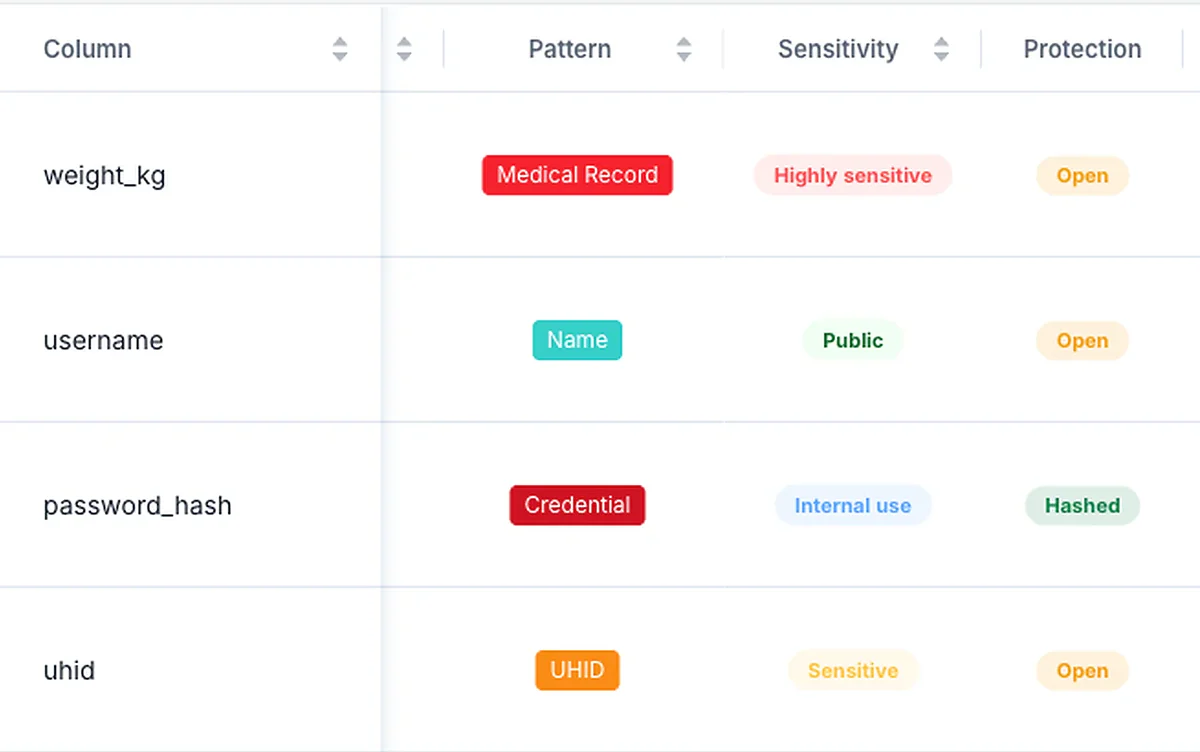
The summary lists the personal-data patterns found most often. Protection status then feeds a risk score that also weighs data sensitivity and who can reach it.
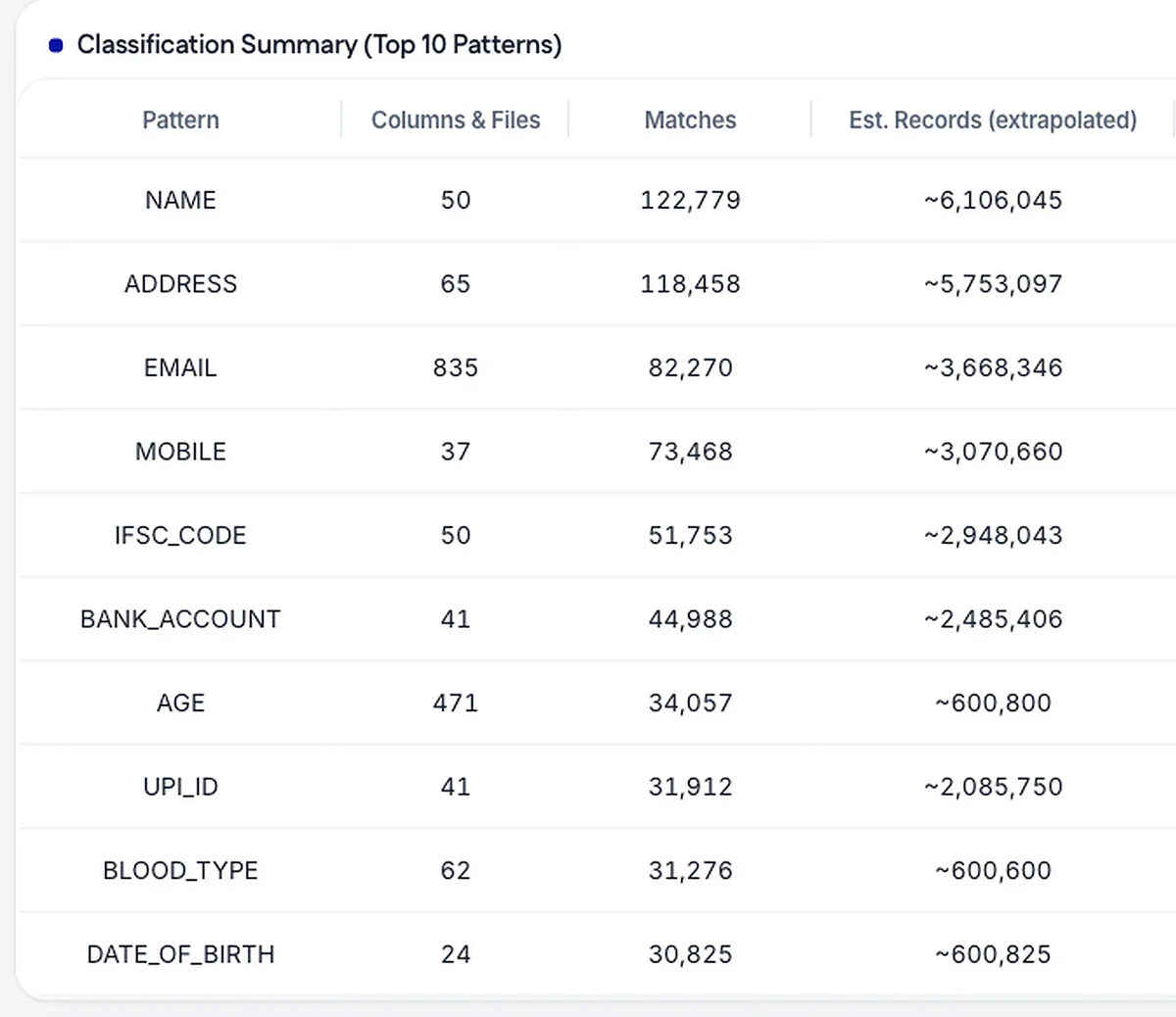
IRIS checks the values in each sensitive column, so a readable access token stored beside hashed passwords shows up as its own finding.
Each personal-data column shows the state of its sample, so the columns in plain form are the first your team fixes.
Each protection finding carries its scan date, and a re-scan after a fix records the new state beside the old one.
IRIS reads sampled values in each sensitive column and checks their form. The state it records describes how a value is stored, and judging whether that protection is strong enough stays with your team. Stored samples are masked by default for personal-data columns, so reviewers see only part of each value.
Format-preserving tokens look like the values they replace, so IRIS records them as plain, as in row six. Password-protected files can’t be opened, so they’re listed as not read, and counted neither clean nor protected.
Your team makes each change in the source system, and a re-scan records the new state. The password row follows NIST SP 800-63B-4, section 3.1.1.2; to see where the check sits in a full scan, follow one on the how-it-works page.
Where the protection check sits among the steps of a scan, from the connection test to the re-scan.
Put protection findings, with their dates, in an evidence register your auditor can trace.
Whether policyholder identity, claims details and payout bank details are stored in plain form.
It checks the form of sampled values in each sensitive column, once the check is activated on your install; until then the check reads not scanned. Your reviewers approve, reclassify or decline each finding.
No. Your team makes the change in the source system with its own tools.
No. Such a token looks like the value it replaced, so IRIS records it as plain. Note those columns as tokens in the review reason.
No. IRIS checks sampled values: it reads a sample of each table, and small tables in full. A column that mixes plain and protected values shows the state of the sample.
No. IRIS checks whether values are encrypted, masked or hashed, or stored in plain form, and leaves the strength of the cipher to your team.
IRIS can’t open them, so it lists them as not read, with the reason. They are counted neither as clean nor as protected.
Get a free assessment of one database and see which sensitive values are stored in plain form.